Start from the locked site URL
An external AI starts with the YC OS site URL, but the app is private. If the page is locked, the agent asks the operator to unlock YC OS or paste the agent handoff.
Choose the reader first. AI docs are compact plaintext for agent context. Human docs start with one technical system map that shows how data-source enrichment, Lu.ma, Supabase, the UI, email, AI review, writebacks, and analytics connect.
Paste this into Claude, Codex, OpenClaw, Cursor, Paperclip, or any MCP-capable agent. It avoids narrative docs and keeps the action contract token-light.
YC_OS_AI_DOCS
auth=locked YC OS; operator unlock/handoff required; Bearer site token supplied outside prompt; never paste token/server secret.
start=GET /api/agent/capabilities truth source; call /api/mcp tools/list then tools/call, or POST /api/agent/tools/call.
read_tools=get_agent_guide,list_event_prep_events,get_event_prep_context,search_founders,list_approval_events,list_approval_queue,get_approval_summary,get_guest_context. Queue reads sanitized; guest context private.
write_tools=MCP only: create_event,add_event_attendees,enrich_event_context,add_event_guests,approve_applications,reject_applications,request_application_info. YC OS runtime executes records/provider effects.
rules=writes are live by default; reason required; use execute=false only when asked to preview; sendEmail=false; max 10 guests; never request .env/service-role/raw provider/shell/DB/GitHub/deploy.
report=page URL,event/filter,tool,live or preview result,next decision.This is the longer reference for humans maintaining the agent contract and checking how scoped reads and guarded actions work.
An external AI starts with the YC OS site URL, but the app is private. If the page is locked, the agent asks the operator to unlock YC OS or paste the agent handoff.
The AI Agent button creates the handoff on dialog open. It includes the MCP config, tools endpoint, capabilities endpoint, and bearer header.
Claude Cowork, Codex, OpenClaw, Cursor, Paperclip, or another MCP-capable agent can read event prep and approval data without raw provider payloads. Standard queue and summary reads omit direct contact fields; get_guest_context exposes private guest context only through the scoped agent handoff.
Agents call YC OS MCP write tools such as create_event, add_event_attendees, enrich_event_context, add_event_guests, approve_applications, reject_applications, and request_application_info. These tools are the agent-native operating surface; secure server code executes YC OS records, provider effects, retries, and audit.
Use this as the pasted operating contract before reading or changing anything.
The operator unlocks the private site with /unlock. The 14-day httpOnly cookie proves the browser is authorized.
Opening AI Agent calls POST /api/agent/sessions and returns the scoped config for the current host.
The agent calls capabilities first, then reads events, queues, dossiers, and event prep context through sanitized tools.
YC OS write tools are live by default when a reason is supplied. Agents use execute=false only when the operator asks for a preview.
After explicit operator instruction, or when the current handoff grants the exact write, the agent supplies a short reason. YC OS records the request and its runtime owns provider execution/retries.
The next Lu.ma sync or webhook brings provider status back into Supabase so approvals and prep stay current.
Capabilities are bearer-authenticated and no-store. Tools return app data shaped for agents, not raw provider dumps.
| Tool or action | Scope | Use |
|---|---|---|
get_agent_guide | read:guide | Read the YC OS agent overview, first task, smoke test, and safety guidance. |
get_event_prep_context | read:event_prep | Read the selected event, founders, lenses, pagination, search, and related founders. |
list_event_prep_events | read:event_prep | List event-prep events, aligned with approval events when possible. |
search_founders | read:event_prep | Search founder/event-prep records by founder, company, category, ask, or need. |
list_approval_events | read:approvals | List synced Lu.ma approval events with counts, source URL, seats, timestamps, and location. |
list_approval_queue | read:approvals | Read a sanitized approval queue page. Page size is capped at 25. |
get_approval_summary | read:approvals | Read a sanitized dossier summary, source comparisons, clarification preview, and AI recommendation. |
get_guest_context | read:approvals | Read authenticated guest/application context with contact fields, source evidence, reply logs, and provider writeback status. |
create_event | write:events | Create YC OS event records through the MCP operating surface; execute=false previews. |
add_event_attendees | write:events | Attach YC founder/company records to an event in YC OS event-prep tables; execute=false previews. |
enrich_event_context | write:events | Add YC OS notes and founder needs to enrich event context; execute=false previews. |
add_event_guests | write:event_guests | Execute YC OS guest-add requests through the secure runtime; execute=false previews. |
approve_applications | write:approvals | Queue YC OS approval decisions for selected applications or filtered queues; execute=false previews. |
reject_applications | write:approvals | Queue YC OS rejection decisions for selected applications or filtered queues; execute=false previews. |
request_application_info | write:approvals | Queue YC OS clarification requests for applications that need more information; execute=false previews. |
These rules are written for agents to read directly before using the handoff.
Agents call MCP tools on the same domain as the site. Approval actions use the same bulk operation as the UI. Guest actions prepare YC OS guest-add requests; the correct write path records the request inside YC OS before secure runtime code touches a provider. Write tools are live by default with a reason; execute=false previews.
MCP tools/call approve_applications
{
  "eventId": "yc-founder-mixer",
  "query": {
    "queue": "ready",
    "segment": "yc_founders",
    "search": ""
  },
  "execute": true,
  "reason": "YC partner asked the agent to approve verified founders"
}
MCP tools/call add_event_guests
{
"eventId": "dogpatch-founder-breakfast",
"guests": [
{
"email": "founder@example.com",
"name": "Example Founder"
}
],
"approvalStatus": "approved",
"sendEmail": false,
"execute": true,
"reason": "YC partner asked the agent to add this founder"
}eventIdInternal YC OS event id from list_approval_events. Pick an event with kind=real and guestAdds=available for execution.
applicationIds / queryApproval tools accept selected application ids or a queue query to mirror select-page/select-all UI flows.
guestsGuest tool accepts 1-10 guests with email, optional name, and optional phoneNumber. Responses avoid returning raw email/name/phone data.
approvalStatusGuest tool accepts approved, pending_approval, or waitlist. Defaults to approved.
sendEmailDefaults to false for agent safety. Set true only when YC OS should ask the provider to email added guests.
executeDefaults to true for write tools. Agents set execute=false only when the operator asks for a preview.
reasonRequired when execute is true. It is used for the action request but is not sent to PostHog.
Include a reason for each confirmed YC OS-owned request. YC OS records safe PostHog metadata such as mode, status code, approval status, event id, send-email flag, and guest-count bucket. It does not capture tokens, emails, names, phones, reasons, or raw provider payloads.
{
  "eventId": "dogpatch-founder-breakfast",
  "guests": [
    { "email": "founder@example.com", "name": "Example Founder" }
  ],
  "approvalStatus": "approved",
  "sendEmail": false,
  "execute": true,
  "reason": "YC partner confirmed this founder should be added"
}This is the operational tree that changed with the Supabase, Lu.ma, unlock, and agent handoff work.
YC_OS_ACCESS_TOKEN unlocks the app and agent handoff. /unlock sets the cookie; bearer auth can also authorize scoped agent endpoints.
Provider and cron endpoints bypass the site lock only for signed work: Lu.ma sync/webhooks/writeback triggers, agent guest-request triggers, and Resend routes still validate route-level secrets or signatures.
Set EVENT_PREP_DATA_SOURCE=supabase and EVENT_APPROVALS_DATA_SOURCE=supabase after the seed/migration work is in place. Local JSON remains a development fallback.
Scheduled syncs use LUMA_API_KEY server-side. Webhooks store provider events idempotently and mark focused events for refresh.
Agent and UI actions create YC OS operations. Supabase Edge Functions claim scoped jobs with locking, update providers, record external responses, and retry transient failures.
Needs-info emails use AI-drafted editable copy and Resend delivery. Replies and webhook events are stored before AI parsing sends evidence back to human review.
PostHog receives categorical product events only: queue names, counts, modes, status codes, and action names. Private applicant text stays masked.
UI and MCP tools record durable YC OS jobs first. These Edge Functions claim the jobs, call Lu.ma or Resend with server secrets, and write success or retry state back to Supabase.
Claims luma_writeback_jobs through claim_luma_writeback_jobs, updates Lu.ma guest status, records provider responses, and retries transient 429/5xx failures.
Claims agent_guest_requests through claim_agent_guest_requests, calls Lu.ma add-guests, stores sent_to_luma or retry state, and keeps agent-created guest adds out of browser code.
Claims clarification_email_jobs, sends Resend clarification emails with idempotency, writes resend_email_id, and supports operation-scoped immediate sends.
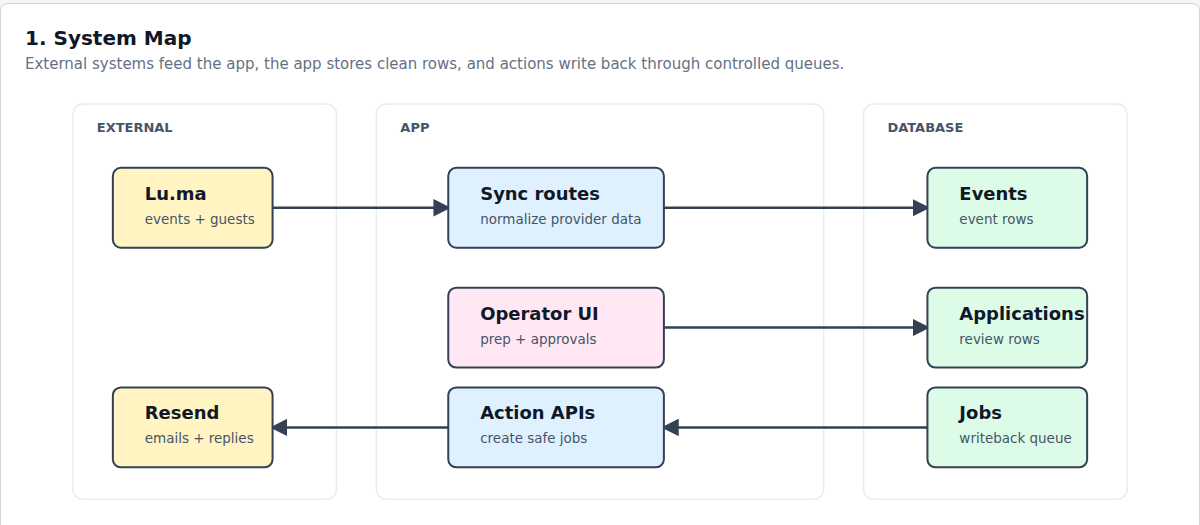
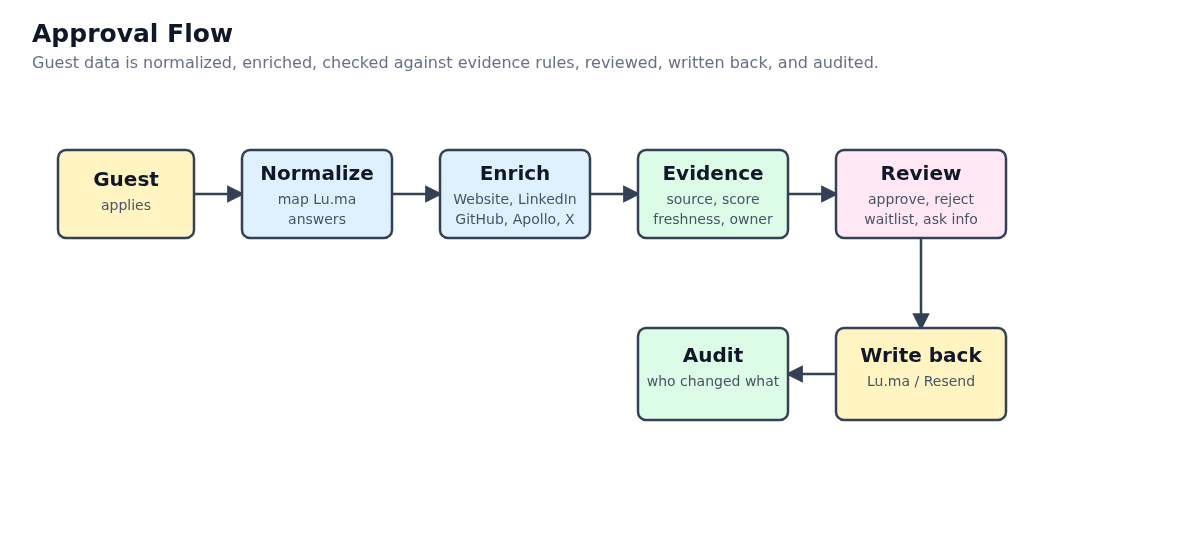
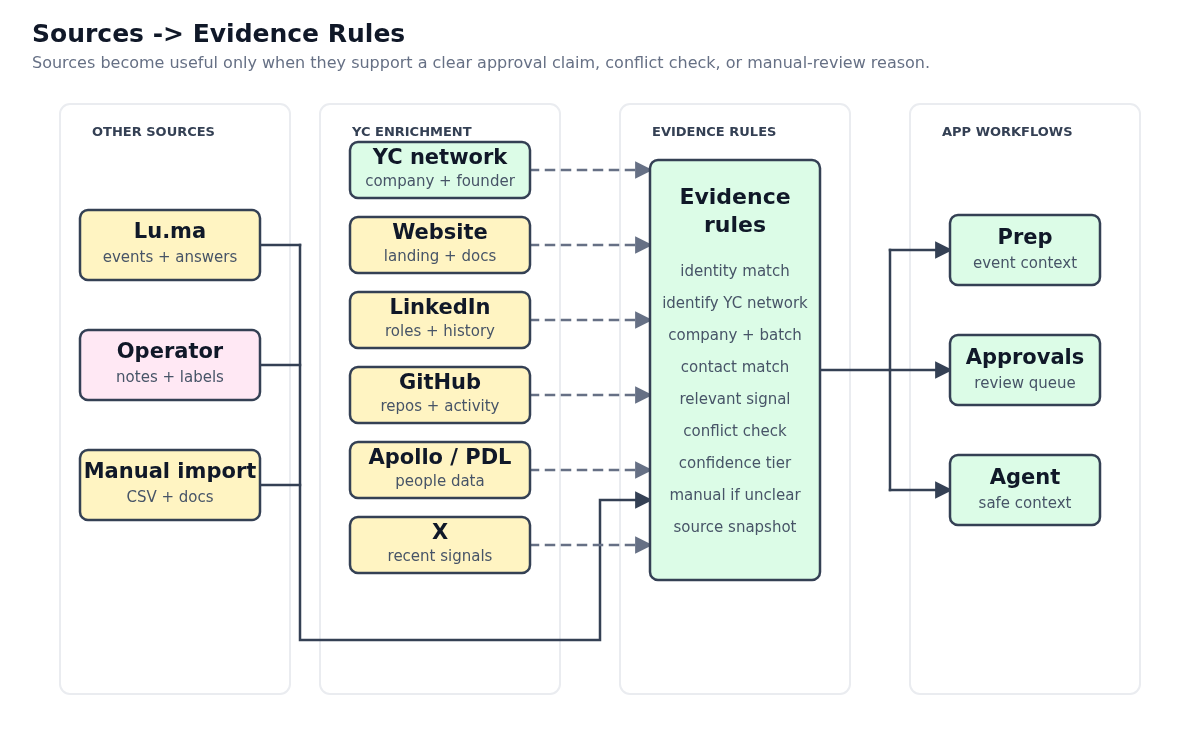
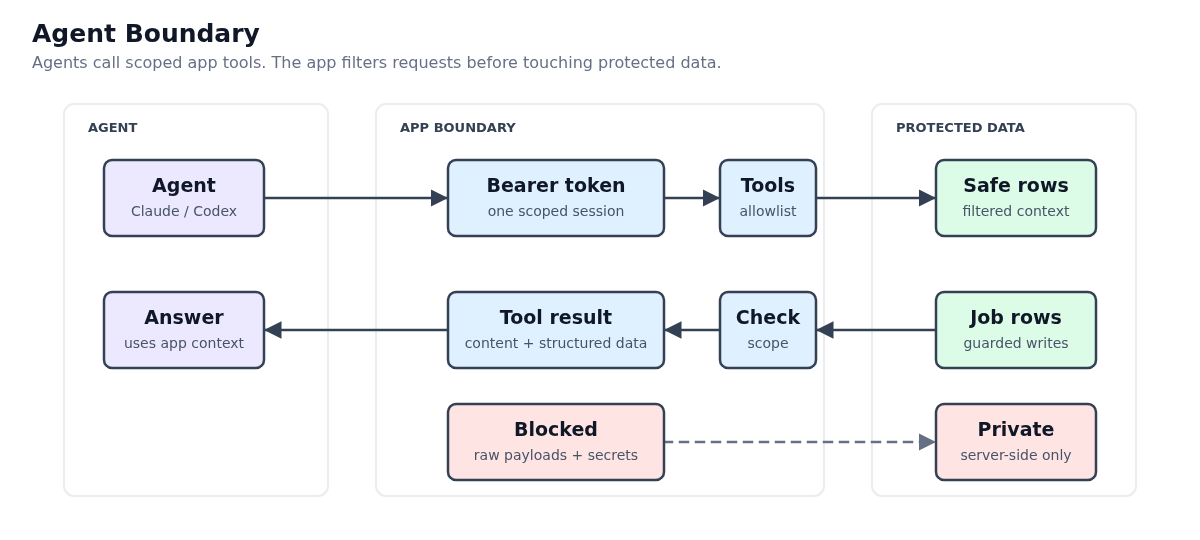
Use these five in the human docs. They replace the old dense card diagram with simpler, pixel-aligned diagrams.
Use this first in the docs. It explains what the app is without implementation detail.
Use this to replace the old one-picture approval flow.
Use this for the data-source section. It makes enrichment and evidence rules explicit.
Use this in the AI agent docs. It explains trust boundaries.
Use this as the final diagram. It clarifies signups, imports, and scoped agent decisions.
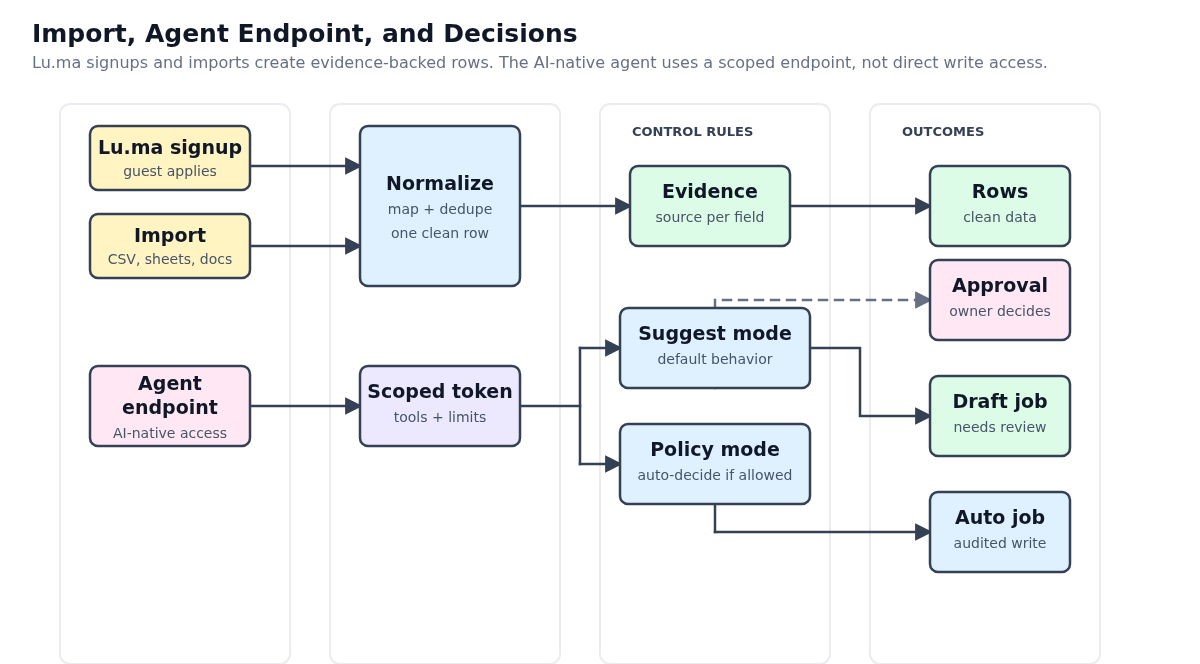
Use scheduled sync as the source of completeness and Lu.ma webhooks as a low-latency signal for changed events.
A cron or manual server action calls POST /api/luma/sync with LUMA_SYNC_SECRET, then paginates Lu.ma events and guests sequentially.
POST /api/luma/webhook verifies Lu.ma's signature on the raw body, stores the provider event idempotently, and marks the event as needing a focused sync.
The approvals UI calls the bulk endpoint, which runs queue_luma_approval_action to record decisions and create writeback or email jobs.
The Supabase luma-writebacks Edge Function claims scoped jobs with SKIP LOCKED, calls Lu.ma by guest API id or email, and schedules retry on 429 or 5xx failures.
Useful when the applicant used a personal email, alternate phone, or unmapped network identity.
The operator can turn internal notes into an editable AI draft, then queue a Resend email from the events sending domain.
Replies land through Resend Receiving/Webhooks, get linked to the Lu.ma application, and are stored before any AI review.
AI extracts company, role, YC relationship, investor/network signal, and confidence. It can mark an application ready or keep it manual.
AI never writes to Lu.ma directly. A user approves selected ready rows or reviews unresolved cases manually.
PostHog tracks product behavior. The app sends event metadata, not private founder/applicant text.
The UI records explicit workflow events such as founder selection, queue changes, dossier opens, note adds, and outbound link clicks.
Client code calls lib/analytics.ts, which only accepts known event names and strips private-looking property keys before capture.
instrumentation-client.ts initializes posthog-js with interaction autocapture off, history pageviews on, and identified profiles disabled until login exists.
Inputs are masked and sensitive UI regions use ph-no-capture so recordings show navigation and layout, not founder notes or applicant identity.
PostHog can answer which event-prep and approval flows are used, where users stall, and which recordings need product review.
Use counts, buckets, queue names, stages, categories, booleans, and action names.
Views, lens changes, search submissions, pagination, founder selection, intro context expansion, and note creation.
Event changes, queue/segment changes, searches, row selection, bulk actions, single decisions, and dossier open/close.
Page view, social links, resume anchor, side projects, references, and demo link clicks.
Names, emails, phones, note bodies, asks, intro openers, evidence text, Lu.ma raw payloads, and registration answers.
The migration enables RLS, ops membership, evidence storage, audit trails, and retryable external jobs.
luma_eventsluma_event_applicationsprovider_webhook_eventsapplicant_identity_matchesapplicant_source_comparisonsapplicant_ai_reviewsapproval_decisionsapproval_bulk_operationsapproval_bulk_operation_itemsagent_guest_requestsluma_writeback_jobsluma_sync_runsclarification_email_jobsapplicant_repliesThe UI should let an owner act on a row, page, or filtered segment without leaving the approvals view.
High-confidence YC founder, investor, network, or guest evidence. Eligible for select-all approval.
Promising but unmapped identity. Eligible for user-triggered clarification email.
Email sent and waiting for inbound response or webhook/reply analysis.
Conflicting identity, weak source match, capacity edge case, or low-confidence AI output.
Verified applicant blocked by event capacity or owner policy.
Final state after a human decision and scoped Lu.ma writeback.
Add provider keys only to server environments. Never prefix them with NEXT_PUBLIC_.
| Key | Where to add it | Reads it |
|---|---|---|
YC_OS_ACCESS_TOKEN | Server-only environment variable | Unlock page, site lock, and scoped agent bearer handoff |
YC_OS_UNLOCK_COOKIE_NAME | Optional server-only environment variable | Overrides the default unlock cookie name |
SUPABASE_URL / NEXT_PUBLIC_SUPABASE_URL | Server-only environment variable | Supabase service client and provider-effect workers |
SUPABASE_SERVICE_ROLE_KEY | Server-only environment variable | Repository and job code that writes protected rows |
LUMA_API_KEY | .env.local locally, Vercel Environment Variables in Preview/Production | Server routes and workers only |
LUMA_CALENDAR_ID / LUMA_ACCOUNT_ID | Server-only environment variables | Lu.ma sync account and calendar selection |
LUMA_API_BASE_URL | Optional server-only environment variable | Overrides the default https://public-api.luma.com base URL |
LUMA_SYNC_SECRET | Server-only route secret; CRON_SECRET or WEBHOOK_SECRET can be used as fallbacks | Signed sync/watchdog routes and Supabase provider-effect functions |
LUMA_WEBHOOK_SECRET | Secret generated by the Lu.ma webhook configuration | POST /api/luma/webhook signature verification |
RESEND_API_KEY | Server-only environment variable | Supabase clarification email worker, signed watchdog route, and reply ingestion |
RESEND_FROM_EMAIL | Server-only environment variable | Verified sender address for clarification emails |
RESEND_FROM_NAME | Optional server-only environment variable | Display name for clarification emails |
RESEND_SENDING_DOMAIN | Server-only environment variable | Verified Resend domain required by the sender address |
RESEND_REPLY_TO_EMAIL | Optional server-only environment variable | Reply-to address for clarification emails |
RESEND_WEBHOOK_SECRET | Secret generated by the Resend webhook configuration | POST /api/resend/webhook signature verification |
LUMA_WRITEBACK_WORKER_URL / LUMA_WRITEBACK_WORKER_STRATEGY | Optional server-only environment variables | Override or force the Supabase luma-writebacks Edge Function path |
AGENT_GUEST_REQUEST_WORKER_URL / AGENT_GUEST_REQUEST_WORKER_STRATEGY | Optional server-only environment variables | Override or force the Supabase agent-guest-requests Edge Function path |
CLARIFICATION_EMAIL_WORKER_URL / CLARIFICATION_EMAIL_WORKER_STRATEGY | Optional server-only environment variables | Override or force the Supabase clarification-emails Edge Function path |
EVENT_APPROVALS_DATA_SOURCE | Use local for seed data, supabase after migrations and secrets are configured | Approval repository switch |
EVENT_PREP_DATA_SOURCE | Use local for seed data, supabase after migrations and secrets are configured | Event-prep repository switch |
OPENAI_API_KEY | Server-only environment variable | Reply parser, recommendation worker, and clarification email draft generator |
OPENAI_EMAIL_DRAFT_MODEL | Optional server-only environment variable | Overrides the model used for notes-to-email clarification drafts |
OPENAI_MODEL / OPENAI_ORG_ID / OPENAI_PROJECT_ID | Optional server-only environment variables | Fallback model and optional OpenAI organization/project headers |
These values are intentionally browser-visible. Use the NEXT_PUBLIC names for preview deployments.
| Key | Where to add it | Reads it |
|---|---|---|
NEXT_PUBLIC_POSTHOG_ENABLED | Browser-safe environment variable | Turns analytics capture on only when explicitly set to true |
NEXT_PUBLIC_POSTHOG_PROJECT_TOKEN | Browser-safe environment variable | PostHog project token used by posthog-js |
NEXT_PUBLIC_POSTHOG_HOST | Browser-safe environment variable | PostHog ingestion path, usually /matchbook-relay |
NEXT_PUBLIC_POSTHOG_UI_HOST | Browser-safe environment variable | PostHog UI origin for links and recordings, usually https://us.posthog.com |
NEXT_PUBLIC_POSTHOG_RECORDINGS_ENABLED | Browser-safe environment variable | Enables session replay for preview review; turn off if masking leaks content |